A Complete Guide to Video Cable Connector Types: How to Choose the Right Connector
A Complete Guide to Video Cable Connector Types: How to Choose the Right Connector
In home theaters, conference rooms, digital signage systems, surveillance setups, and computer displays, video cables play an important role in transmitting images and sound.
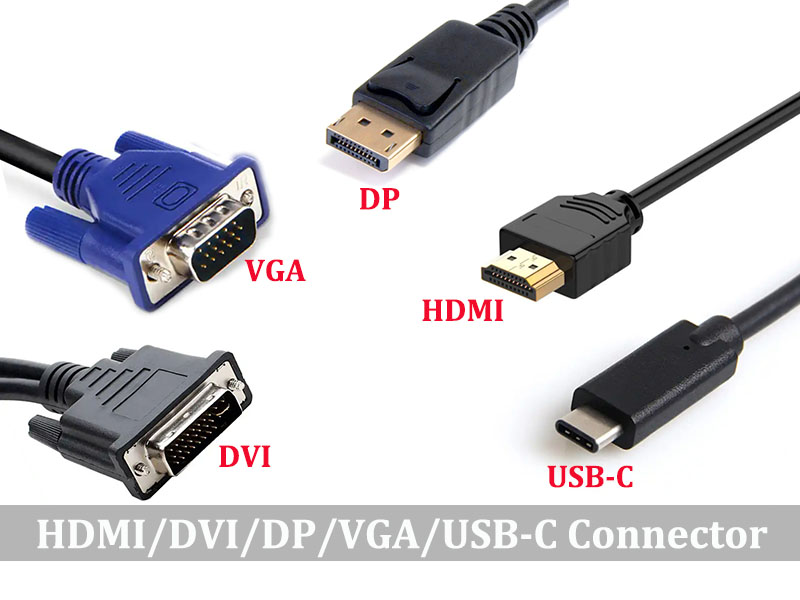
Video cable interfaces are mainly divided into digital and analog categories. At present, HDMI, DP and USB-C are the most commonly used in computers and TVs, and VGA or DVI
may still be seen in old devices.Different devices use different connector types, so understanding the most common video interfaces can help prevent compatibility issues and deliver
a more stable, clearer viewing experience.
HDMI: A Popular Choice for Home Entertainment
HDMI is one of the most widely used digital video interfaces today. It is commonly found on televisions, projectors, computers, gaming devices, and Blu-ray players. A single
HDMI cable can transmit high-definition video and multichannel audio, making installation simple and convenient.
Depending on the device and cable specification, HDMI can support different resolutions, refresh rates, and high dynamic range features. When choosing an HDMI cable, pay
attention to the HDMI version, cable length, and port specifications on both devices. This can help prevent issues such as flickering or a blank screen.
DP(DisplayPort): Ideal for Computers and High-Refresh-Rate Monitors
DisplayPort is commonly used with desktop computers, graphics cards, and professional monitors.It is particularly suitable for high-resolution and high-refresh-rate applications.
Compared with some HDMI specifications, DisplayPort offers strong expandability for computer displays and multi-monitor setups.
Many DisplayPort connections can be adapted to HDMI or other display interfaces.However,compatibility depends on the signal direction and the protocols supported by the
devices. Before purchasing an adapter or cable, carefully check whether it supports the required connection method.
DVI: A Traditional Digital Display Interface
DVI was once widely used with computer monitors and graphics cards and can still be found on some older equipment.It is primarily designed to transmit digital video signals,
although certain versions also support analog signals.
Different DVI connector types have different pin configurations and signal capabilities. DVI-D, DVI-I, and DVI-A cannot always be used interchangeably.For older computers and monitors,
selecting the correct DVI cable is essential to avoid connection problems or a missing image.
VGA: A Classic Analog Video Connector
VGA is an older analog video interface commonly found on legacy computers, projectors, and monitors.It generally transmits video only, so audio must be connected separately.
Because VGA uses analog signal transmission, image quality can be affected by cable quality, cable length, and electromagnetic interference. If a device provides a digital interface,
HDMI or DisplayPort is usually the preferred option. However, VGA remains useful when connecting older equipment.
USB-C Video Output: A Growing Trend for Slim Devices
More laptops, tablets, and smartphones now use USB-C ports for video output. However, not every USB-C port supports video transmission.The source device must provide a compatible feature,
such as DisplayPort Alt Mode or another supported video output standard.
When using a USB-C to HDMI or USB-C to DisplayPort cable, confirm the specifications of the source device, display, and cable. This helps ensure that the desired resolution and refresh rate can be achieved.
Practical Tips for Choosing a Video Cable
When selecting a video cable, do not focus only on appearance or price. First, confirm the connector type on both ends. Then check your requirements for resolution, refresh rate, audio transmission,
and HDR support. Finally, choose an appropriate cable length based on the actual installation distance.
Longer cables may require better shielding and signal design, while excessive bending can shorten the service life of any cable. Whether for home use, office applications, or professional installations,
a well-made video cable with clearly stated specifications is usually a better choice than simply purchasing the cable with the highest advertised version number.
Whether you need HDMI, DisplayPort, DVI, VGA, or USB-C, the right video interface should be selected according to device compatibility and actual application requirements. By confirming the
interface standard in advance and choosing the appropriate cable type, you can achieve a more stable display connection and make better use of your playback device and screen.
Need Custom Cables or Connectors for Your Project?
We produce premium video cables and connectors,customized lengths,and jacket materials are available to match your project requirements.Our engineering team can assist you in selecting the optimal
cable for your use case.Contact us for a technical consultation or custom quotation.
A Free CE and RoHS Certificate,Exchanged for Long-term Cooperation
Distinguish These Audio Connectors:TRS vs TS vs RCA vs XLR
Related Article